Buying Cash Points
They are bought in the game now: open the shop, pick a pack and pay with Mercado Pago by scanning a QR code with your phone.
Updated:
Cash Points are bought from inside the game, no website needed. You pick a pack, the game shows you a QR code and you pay it with Mercado Pago from your phone. Then you spend them in the MU Item Shop.
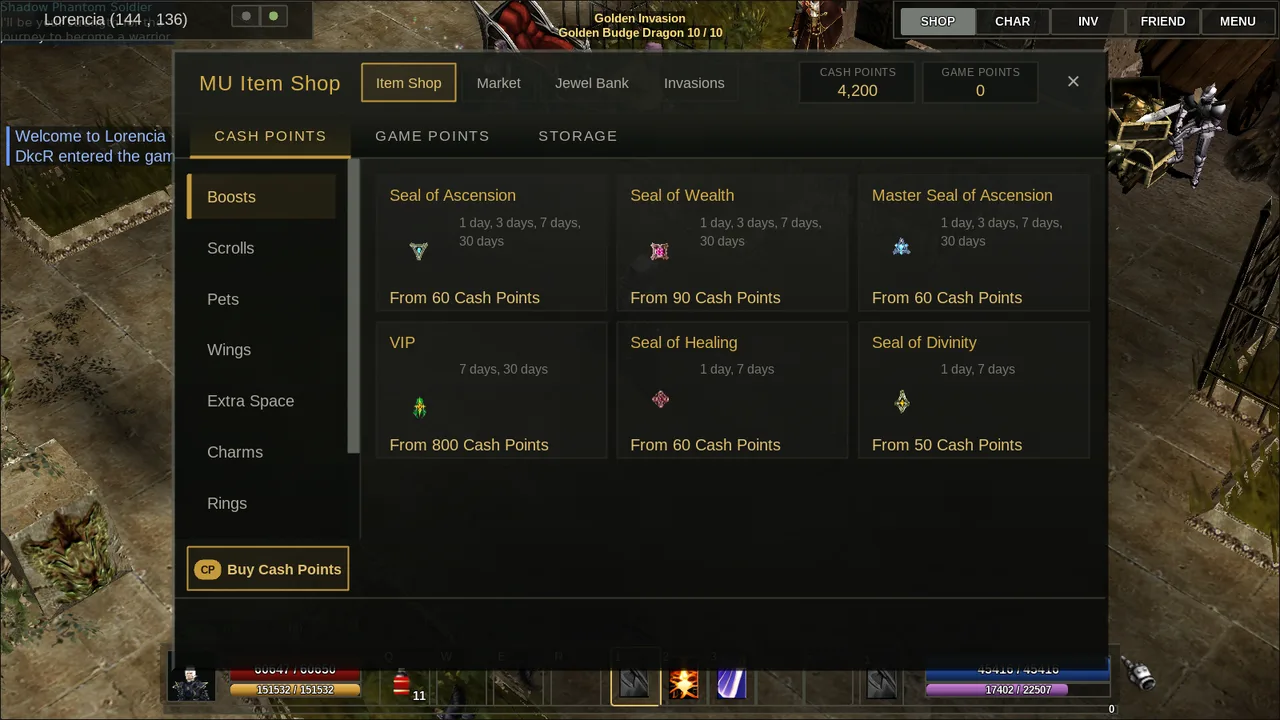
How to buy
- Press X to open the MU Item Shop.
- Under the category list there is a gold Buy Cash Points button. Click it.
- Pick a pack. Each one shows how many Cash Points it brings and its price in Argentine pesos.
- The game says “Creating your order…” and a moment later a QR code shows up.
- Scan the QR code with your phone’s camera and pay with Mercado Pago, by card or with your account.
The QR code lasts 15 minutes (you see “Expires in …” under it). If it expires, pick the pack again and you get a new one.
After you pay
- The game checks the payment by itself every few seconds. Once it is confirmed you see “Payment received: +N Cash Points” and your new balance.
- If you closed the game before it was confirmed, no worries: the Cash Points still reach your account.
- If the payment does not go through, you are not charged and you can try again whenever you like.
Good to know
- You can have one open order per account and make up to 5 orders per hour. Past that, the game tells you to try again in a while.
- If payments are not available at the moment, the window says so and shows no packs.
- The game never sees your card details: Mercado Pago handles the payment.