The MU Item Shop
How to earn and spend Cash Points and Game Points with the X key.
Updated:
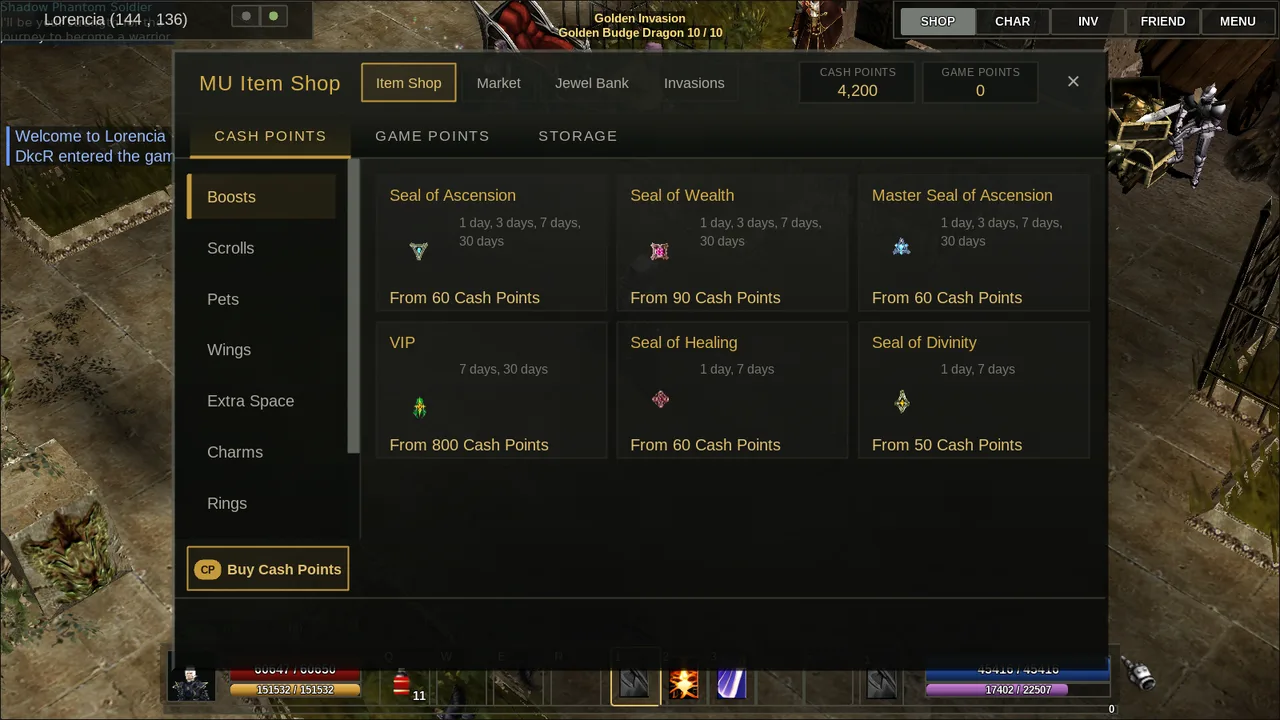
Press X in any town to open the game’s item shop. It has two sections:
- Cash Points: the server’s premium currency.
- Game Points: earned by playing. You get Game Points for killing invasion monsters (and Kundun): each kill pays a random amount within a range, and tougher monsters pay more. The player who lands the killing blow gets the points. You also earn 60 Game Points for each question you win in the Trivia event.
Almost everything can be bought with either currency, each with its own price. The exception is the skill book packages, which sell for Game Points only (100 each).
The shop window also has tabs for the Market, the Jewel Bank and Invasions, and under the categories there is the Buy Cash Points button (how buying works).
Using what you buy
What you buy lands in the shop’s own storage first, not straight into your inventory. Open the Storage tab and use the item from there:
- Seals, scrolls and VIP take effect right away. Using one from the storage starts its bonus at once; nothing goes to your bag. If the same boost is already running, the new days are added to the time it has left. Different boosts run together.
- Everything else moves into your inventory, including the Pet Panda, whose time starts the first time you equip it.
Gifts
Every product can be sent as a gift. Choose it, press Gift (the Present button on PC), type the name of the character who should get it and, if you like, a message. The price comes out of your balance, and the item waits in the recipient’s Gift Inventory, the storage’s second tab, with your name and your message. They use it from there like anything they bought.